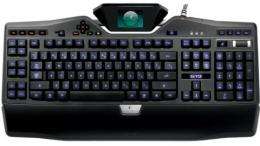
G19 keyboard goes way beyond typing
It seems like the ordinary is no longer acceptable when it comes to the ordinary things we attach to our computers these days. For example, I'll bet the computer mouse you are using is at the very least an optical, cordless model. I'm even willing to bet it's one of those sleek, ergonomic models that sport extra buttons that can fire off macros with a simple click. That screen you're staring at is probably a flat panel display that may even be capable of displaying high definition television images.
My point is that we're taking these devices for granted. They are no longer considered to be state-of-the-art but rather the norm. It was only a few short years ago that these peripherals were considered to be exotic, top-of-the-line devices that came with a healthy price tag. Now I can't imagine using my computer without them.
The computer keyboard has been no slouch either when it comes to enhancements. But while there are many extreme, even exotic keyboard designs, for some reason they remain pretty much the same on most computers. I'll take another bet and guess that the keyboard you use is a pretty straight-forward one with a row of function keys at the top and a numeric keypad at the right. I'll even bet that it's a corded model. For some reason, you don't see fancy keyboards on many computers out there. Still, I'd like to point out a new keyboard that was recently introduced from Logitech called the G19. In a word, it's amazing.
Officially it's called the G19 keyboard for Gaming and while gaming is really what it's designed for, you may still want to own one even if you never plan to play a single computer game. Each and every key on the G19 is backlit and you can even select the color of the glowing keys. This is nice if you type in a dimly lit room or even in the dark. It also sports a detachable palm rest. On the left side, there are 12 programmable G-keys to which you can assign up to three different sets of macros. A macro is a pre-defined series of keystrokes that will activate when pressing a single G-key.
Other features include cable management, one-touch controls that let you control volume and media playback and two powered USB ports. But I've saved the best feature of the G19 for last and that's its built-in video display. That's right, this keyboard has a color display Logitech calls their Tiltable, color GamePanel LCD. This is a small 320 by 240 display that sits at the dead center top of the keyboard. It swivels so that you can adjust it to the optimal viewing position. The idea here is that you can look down at the keyboard and still acquire needed information about the game you are playing. Depending on the game, you may see things like game statistics, Voice Over IP communication data information, scores and navigation data. Other supported applications and utilities may display video playback or slideshow images. To see a list of all of the supported games, utilities and applications, Logitech maintains a special web page (www.logitech.com/gamepanel) that lists their titles.
The G19 ($199.99) is one very cool-looking keyboard that can really enhance your typing experience. Yes, it's not for everybody but then again, neither is that cordless mouse you're using. Some will still prefer a corded mouse and a big cathode ray tube display. Hopefully, you're not one of them.
(Craig Crossman is a national newspaper columnist writing about computers and technology)
___
(c) 2009, McClatchy-Tribune Information Services.


