May 18, 2009 weblog
Microsoft Incorporates Virtual WiFi Technology into Windows 7
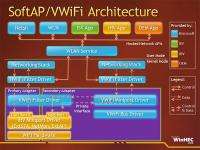
(PhysOrg.com) -- Virtual WiFi will enable Windows 7 and future operating systems to see a single WLAN adapter as multiple WLAN adapters by the operating system. This feature is available in Windows 7 RC1, however because there are no hardware drivers to support this, the feature remains inactive.
Some of you may wonder why you would ever need more than one WLAN adapter in your PC. There may be a few circumstances where multiple WLAN adapters would be needed. For instance, you may want to connect to one wireless network and use the virtual adapter to turn your PC into a hot spot so that other computers could connect to and share the internet access.
Another example, for using virtual WiFi, may be where you're connected to an existing wireless access point and want to connect to another network whether that is a separate access point or even set up an ad-hoc connection, Virtual WiFi will allow you to do just that.
Virtual Wi-Fi is going to be a requirement for WLAN drivers sporting the Windows 7 certification logo, so drivers will be coming to add support for the feature.
Windows 7 installs a virtual device if a Hosted Network capable WLAN adapter is present on the PC. This virtual device shows up in the "Network Connections Folder" as 'Wireless Network Connection 2' with a Device Name of 'Microsoft Virtual WiFi Miniport adapter' if the PC has a single WLAN adapter. This allows the virtual device to be used solely for performing software access point (SoftAP)connections.
More technical information aimed at hardware vendors and developers is available at the WinHEC 2008 session, "Wireless LAN Enhancements in Windows 7.″
© 2009 PhysOrg.com


