Review: Wireless charging lets you cut the cords
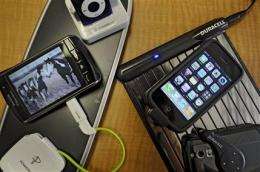
(AP) -- It's a pain to keep track of the chargers that go with cell phones, media players and other small electronics. It's even more annoying to stuff multiple power cords and adapters in your bag when you go out of town.
What if you could charge things without plugging them in?
I've started doing just that. I tested two mats that juice up small devices like iPods on contact, with only the mat plugged into an outlet rather than each gadget. The mats are far from perfect, requiring special sleeves and adapters for electronics. But there's something thrilling about cutting (most of) the cords.
The first product I tried came from Powermat USA, which started selling two $100 mats this month.
One of them is an oblong mat designed for home and office use, which impressed me right out of the box because it was easy to set up and compatible with lots of popular gadgets. Powermat also sells a rectangular one that folds into thirds for traveling.
Both are available at Best Buy and Target, and are expected to start selling through Amazon.com next week.
Each Powermat comes with a little white cube that sports a miniUSB connector - the kind that goes into BlackBerrys and numerous other phones - and eight different tips that fit the charging port on an iPhone, iPod, Sony PSP and other small electronics. Once you connect your gadget to the cube with the appropriate tip, you drop the cube onto the mat to start charging.
You can skip the step of using the cube, but that will cost more money. Powermat sells plastic cases for devices such as the iPhone, iPod Touch and Nintendo DSi, along with special back covers for some BlackBerrys. All these let you charge the devices by simply plopping them down on the pad. There's also a small charging dock that fits an iPod or iPhone.
These add-ons run $30 to $40. But it is much easier to keep the special case on an iPhone and then simply drop it on the pad when you need more juice.
Each Powermat can charge three gadgets at once; magnets hold them in place. When you put a phone on the Powermat it emits a soft white light and a chirpy "zzwhip" sound to let you know it is properly connected. A somewhat opposite noise tells you when the connection is broken.
Powermat uses induction to charge your electronics. Basically, when you drop a Powermat-enabled device on the mat, the two exchange a "handshake" using RFID, or radio-frequency identification technology. The mat identifies the device, determines how much power it needs, then starts transferring energy to it. Once a device is fully charged, Powermat will stop the electricity from flowing.
More important to me than the process was the speed, and Powermat charged my gadgets pretty quickly. It took about an hour and a half to refill an iPod Nano, an iPhone, and an HTC myTouch smart phone. That was about as long as it took when I plugged the myTouch and iPhone into the wall with traditional adapters. The iPod Nano needed even more time in a wall outlet, at a little more than two hours.
The other mat I tested, Duracell's myGrid ($80), was less impressive. It had sluggish charging times and more limited usability.
Initially released in 2007 by a company called WildCharge Inc. and recently licensed by Duracell, the myGrid consists mostly of a flat plastic square topped with mirrored metal slats. It will be in some Target stores this month, and is due to hit Radio Shack stores later in the year.
The pad will come with a few tips that plug into the bottom of cell phones. Those tips have to be connected to a "power clip," and a magnetic disk that you stick on the back of your phone helps keep the clip in place during charging. That's cumbersome. If all goes well, everything will stay connected, and a bright blue light on the side of the pad lets you know that your gadgets are being powered up.
Of course, this is assuming you have a gadget that is compatible with the pad. MyGrid's Web site says the product works with several Nokia, Motorola and BlackBerry phones, and since the tip that fits these latter two categories is a miniUSB tip, it should also work with other devices that have this charging port. I was able to charge the myTouch with it, though its slightly curved back made it a little difficult to keep everything connected.
If you have a BlackBerry Curve or Pearl or an iPod Touch you can buy a $35 rubber case that can also charge the gadget when you place it on the myGrid pad. I tested one that fits on the iPhone (it will be out in March) and found it super simple.
MyGrid works differently than the Powermat, and requires that metal contact points on the clips and rubber sleeves be touching the pad for power to be transferred to your phone.
It also took me longer to charge devices with the myGrid than with the Powermat: a bit more than 2 1/2 hours for an iPhone, and about four hours on a myTouch. I couldn't power up an iPod Nano because the Duracell pad lacks a compatible tip or case.
The myGrid's advantage is that you can charge up to four devices at once instead of three, and it doesn't matter where you place them on the pad.
But overall, because of its greater compatibility with gadgets and faster charging times, Powermat offers a better option, even if it is more expensive.
©2009 The Associated Press. All rights reserved. This material may not be published, broadcast, rewritten or redistributed.


